
Tattoo studio lighting: choose a lamp for more than its brightness
Learn what to check in a workstation lamp: light output, colour rendering, shadows and mounting, with buying questions and a practical check on paper.

A lamp can feel like an afterthought until your hand blocks the exact line you are trying to draw. Or until a red patch looks different when you carry the sheet into another room. If you are building your first setup, approach tattoo studio lighting through four questions: what area does it cover, how can you position it, what colour information is available, and where will its support fit?
We would prioritise an adjustable light with a practical mounting arrangement and a specification that explains its performance. Buying the most powerful model before answering those questions could leave you with the same shadow and less desk space. This is a guide to comparing lamps and observing a drawing desk, not a laboratory test or a lighting design for a particular premises.
The room and the drawing need different kinds of attention
The Canadian Centre for Occupational Health and Safety distinguishes general lighting from local task lighting. General lighting covers a broad area; task lighting increases illumination around the work and often allows individual adjustment.
For a desk where you prepare designs, that suggests considering two levels: seeing the surroundings and reading the paper clearly. A concentrated light over the sheet does not automatically take care of everything around it.
Watts, lumens and lux answer different questions
Watts describe electrical power input; lumens describe the amount of light emitted. Lux measures illuminance at a surface: one lumen per square metre. A power-consumption figure is not a promise about what you will see on your desk.
Keep the unit beside every number you copy from a listing. A lux figure needs context about where it was measured. Ask about distance and coverage before treating two headline numbers as a useful comparison.
Turn the specification into buying questions
This short reading guide helps expose missing information. An empty field is a reason to ask the seller, not to assume a feature exists.
| What to check | What the listing gives you | What to ask next |
|---|---|---|
| Power and output | Watts and lumens | Are both stated, or only power consumption? |
| Illuminance | Lux at the working surface | At what distance and in which position? |
| Colour | Temperature in K and CRI | Are these given as separate specifications? |
| Adjustment | Height, direction and dimming | Do they suit the position where I will work? |
| Mounting | Base, clamp and power supply | Will they fit without obstructing movement? |
White light does not tell you everything about colour
Colour temperature, measured in kelvin, describes the warmer or cooler appearance of the light. CRI addresses a different issue: how faithfully colours appear compared with a reference. These are separate properties.
The US Department of Energy describes a CRI of 90 or above as excellent, while explaining its limitations: saturated reds need additional information, such as R9. A “daylight” label or a wide adjustable kelvin range therefore cannot replace colour-rendering data.
Look at the yellow pepper as well as the chart
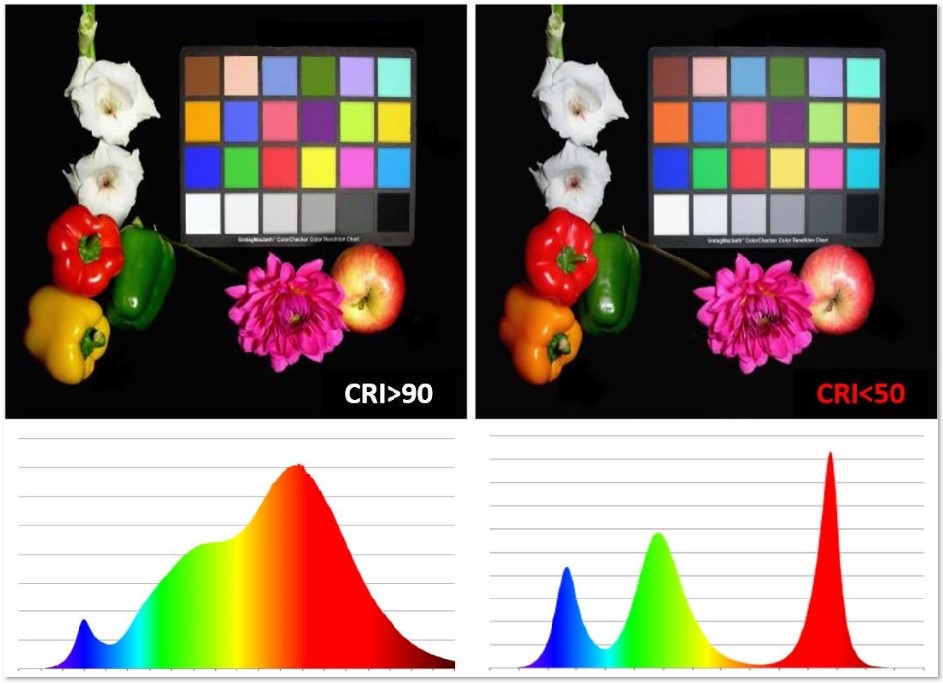
Find the shadow before turning up the brightness
CCOHS explains that a bright source or its reflection can interfere with seeing an object. Its suggested remedies include repositioning fixtures and using adjustable local lighting. It also identifies glossy surfaces as possible sources of reflected glare.
At a drawing desk, the useful implication is to examine position before deciding that more power is needed. Additional output and a better placement are different purchasing decisions.
Try a ten-minute check with your own drawing
Put a finished sheet where you normally draw and sit in your usual position. Choose three specific details: a fine line, a dark area and a colour you find difficult to distinguish. For now, resist arranging the scene for an attractive photograph.
Bring your pencil towards each detail. Watch for the shadow of your hand and for reflections that make you move your head. Change one thing at a time, starting with the direction of the lamp. Then try another height within the support's intended range. Note which detail becomes easier to read in each position.
Repeat the check near the edges of the sheet. A position that works at its centre may not suit a large drawing. The useful outcome is a particular requirement—more reach, another angle or adjustable output—not a made-up quality score. This exercise does not measure CRI either; that requires suitable documentation or testing.
Buy the support as carefully as the light
Before choosing between a floor stand and a clamp, sketch a small plan of your setup. Mark the chair, desk, socket and the route you take when standing up. Add the footprint of the base. For a clamp, check the thickness and shape of the proposed mounting edge against the manufacturer's requirements.
Imagine the arm at both ends of its useful range: folded back and extended. Can it reach the paper without making you change your working position? Does the head enter your line of sight? Can you reach its controls when the desk is occupied?
These ordinary questions can rule out an unsuitable format before you start debating brands. They can also reveal that rearranging existing equipment is a more useful next step than immediately buying another lamp.
What a tattoo starter kit includes—and what your setup still needs
A catalogue example: putting the questions to work
The Adonafy in our catalogue is a floor-standing LED lamp with a folding half-moon head and a phone holder. Its product page gives you a concrete format to compare against the space you have.
Use it to work through the questions: height, power supply, adjustment and advertised colour specifications. The shape of the arc alone does not establish that it will remove every shadow in your setup. A phone holder does not automatically make the lighting suitable for every photograph either.
Reading a drawing and photographing it are separate checks
Once you have found a useful working position, give the camera its own moment. Avoid relying on an appealing listing photograph as your only buying evidence: you want to know how the lamp will fit into everyday use.
When preparing portfolio images, decide what the picture needs to communicate. Surface texture, the complete sheet and a small detail may call for different framing. Keep the aim of documenting the work faithfully, rather than treating each change in lighting as a reason to edit its colour.
For work on skin, our phone-photography guide explores that problem in more detail. The purchasing decision here comes earlier: looking for controls and positioning options you can actually use. That is a more helpful starting point than expecting one attractive setup photograph to answer every question.
Photograph tattoos with your phone without altering the result
The questions worth taking shopping
Keep these beside the measurements of your workspace. When two lamps look similar in their promotional images, the answers should make the comparison more concrete.
- What am I trying to solve: reach, a shadow, a reflection or missing colour information?
- What is the base footprint, or what mounting arrangement does the clamp require?
- Can I aim the head and adjust the output from my normal working position?
- Does the specification separate colour temperature, colour rendering and light output?
- Which details are missing, and which can I confirm before buying?
Choose an improvement you can explain
A useful conclusion is not “this one uses more watts”, but “this one reaches the area I need and lets me adjust it without rearranging the desk every time”. If you cannot yet describe what is wrong with your setup, begin with the paper exercise. Finding a shadow or a reach problem gives you a more useful buying criterion than a spectacular photograph.
Sources and editorial notes
- CCOHS · Lighting Ergonomics — General
- US Department of Energy · Buying light bulbs
- Microsoft Learn · Understanding lux values
- Energy Rating · Choosing the right lamp
- US Department of Energy · LED Basics
- CCOHS · Lighting survey and solutions
- Luxaplan · Farbwiedergabe comparison
- Ragesoss · Architecture desks at Yale
- TattooXpert · Adonafy half-moon lamp
Manufacturer and organiser facts are linked above. Our selection and reading advice expresses TattooXpert’s editorial judgement.
Our editorial methodFROM THE PAGE
TO YOUR STUDIO.

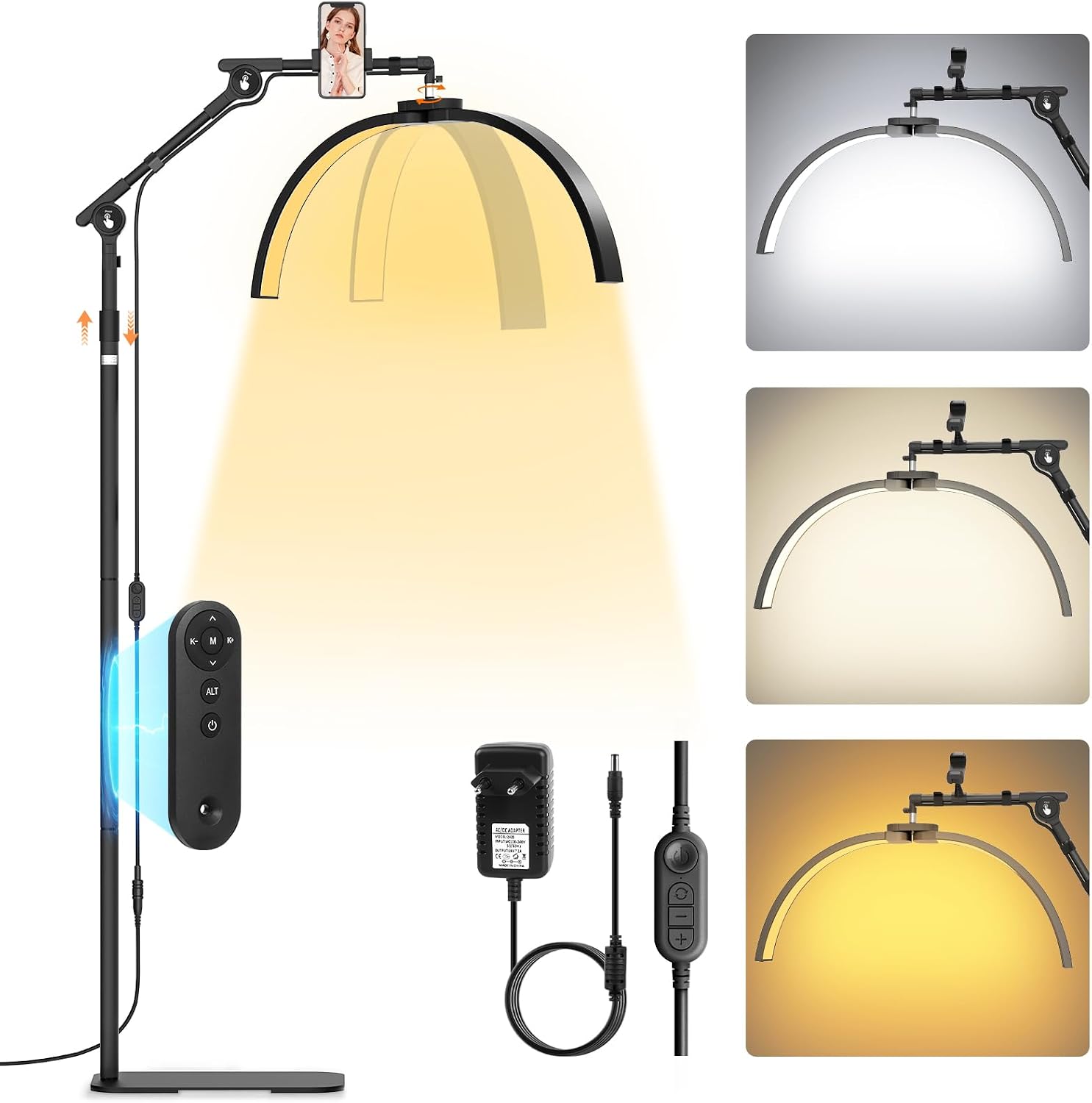
A floor lamp with a half-moon head, phone holder and wireless remote for setting up your workstation lighting.
KEEP EXPLORING.

Digitize drawings for your tattoo portfolio without losing the detail
A practical guide to photographing or scanning drawings, preserving subtle marks and preparing files to share. Understand resolution, review filters and check the copy you actually send.
TattooXpert
How to photograph tattoos with your phone without altering the result
Photograph tattoos with your phone: organise the light, check reflections and framing, and keep colour faithful without altering the work.
TattooXpert